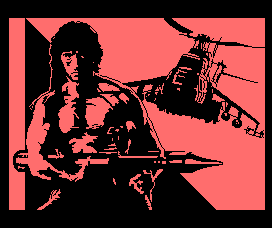
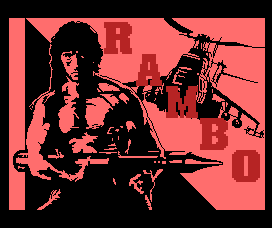
Download: rambop.v2.ips (patch file)
Download: rambop.v2.zip
Quando criança, Rambo era um dos meus jogos prediletos. Era um RPG bem díficil
de completar, se você não soubesse a seqüência exata de telas a seguir! Eu gostava
tanto do jogo, que acabei comprando um cartucho original japonês, e até mesmo
traduzi alguns trechos do manual. Mas apesar
disso tudo, tinha um detalhe que sempre me incomodou: a tela de abertura.
Se o jogo é todo colorido, porque a tela de abertura tinha que ser
monocromática e feiosa? Certamente o pessoal da Pack-In-Video podia ter
feito uma tela melhor. E então eu resolvi encarar o desafio, pegar o jogo original
e melhorar a tela de abertura, mantendo os requisitos originais: MSX-1
com 16kb de RAM, e tudo dentro de um cartucho de 32kb de ROM.
Refazer a tela de abertura foi o trabalho de um fim de semana feito
com a ajuda do Cyberknight,
usando o Graphos III do
Renato Degiovani.
O real desafio foi colocar de volta a tela dentro da ROM. A tela original,
comprimida com RLE, ocupava 2.6kb de espaço. Então essa minha nova tela tinha
que ser comprimida nesse mesmo espaço, o que se revelou ser uma tarefa extremamente
difícil! No final, usando algoritmos no estado-da-arte em compressão, finalmente
foi possível colocar a tela de volta dentro do jogo.
O resultado está disponível aqui para download na forma de um patch .IPS. Divirtam-se!!!
As a child, Rambo was one of my favourite games. It was a very difficult to finish RPG,
when you didn't know the exact sequence of screens to follow. I liked the game so much
that I bought an original japanese cartridge, and even translated some bits of
the manual. But there was a drawback with this game... the
opening screen!
If the game is all colorful, then why the opening screen was monochrome and ugly?
Certainly the people of Pack-In-Video could have made it better. So
I accepted the challenge to improve it, while still mantaining the
original requirements of the game: MSX-1 with 16kb of RAM, and the entire
game fitting in a 32kb ROM cartridge.
Redrawing the opening screen was a weekend's worth of work, done
with the help of Cyberknight,
and using the Graphos III made by Renato Degiovani.
The real challenge was putting the screen back into the ROM. The original
screen, compressed with RLE, had 2.6kb. So the new screen had to fit into
this same space, and that was very difficult to achieve! In the end I
managed to compress it, using state-of-the-art algorithms.
The final result is available as an .IPS patch in this page to download. Have fun with it!
 O primeiro desafio de Rambo Plus foi, é claro, desenhar a tela de abertura.
Como o processo usado foi muito similar ao usado em N-Sub,
eu não vou entrar em detalhes, e vou focar mais no segundo, e mais difícil desafio:
a compressão. A nova tela de abertura, comprimida pelo GIF, tinha 4328 bytes. A tela
original usava os endereços de AC10h a B768h da ROM, e também tinha um espaço sobrando
no final da ROM depois do endereço BD82h (preenchido com o texto 王様の耳はろばの耳,
"o rei tem orelhas de burro"). Isso significava que apenas 3542 bytes estavam
disponíveis, então qualquer compressão que eu fosse criar tinha que ser melhor que o GIF.
O primeiro desafio de Rambo Plus foi, é claro, desenhar a tela de abertura.
Como o processo usado foi muito similar ao usado em N-Sub,
eu não vou entrar em detalhes, e vou focar mais no segundo, e mais difícil desafio:
a compressão. A nova tela de abertura, comprimida pelo GIF, tinha 4328 bytes. A tela
original usava os endereços de AC10h a B768h da ROM, e também tinha um espaço sobrando
no final da ROM depois do endereço BD82h (preenchido com o texto 王様の耳はろばの耳,
"o rei tem orelhas de burro"). Isso significava que apenas 3542 bytes estavam
disponíveis, então qualquer compressão que eu fosse criar tinha que ser melhor que o GIF.
É aí que o problema começa! O GIF usa LZW, e esse algoritmo pode ser provado que é ótimo
(quando o tamanho do arquivo vai para o infinito). Então como alguém pode fazer
melhor que um algoritmo ótimo? A solução é o mantra da compressão: conheça seus dados.
O único jeito de bater uma compressão estatística é modelando seus dados,
extraindo redundâncias. Se tiver uma maneira de jogar dados fora, melhor ainda!
Dessa maneira, vamos ver o que sabemos sobre nossos dados. Sabemos que os
dados representam uma imagem, então não apenas existe redundância na horizontal,
mas também na vertical. Sabemos que a imagem é SCREEN 2, então cada
oito pixels consecutivos podem ter apenas duas cores (de 15). Isso significa
que podemos quebrar nossa imagem complexa em três imagens mais simples, a primeira
sendo uma imagem monocromática que representa os padrões (pattern), e as outras
duas contendo, respectivamente, as cores dos bits "1" e dos bits "0", sendo
ainda que essas duas imagens têm apenas 1/8 do tamanho horizontal da primeira.
As três imagens podem ser vistas abaixo, notando que eu aumentei oito vezes
a largura das imagens com as cores para que todas tivessem o mesmo aspect ratio.
The first challenge in Rambo Plus was, of course, to create the new opening screen. Since
the process used to create was very similar to N-Sub, I won't go
into details, focusing instead on the second, and more difficult challenge: the compression.
The new opening screen, compressed by GIF, has 4328 bytes. The original screen used address
AC10h to B768h in the ROM, and there was also some empty space in the end of the ROM after
BD82h (filled with the text 王様の耳はろばの耳, "the king has donkey's ears"). This means
only 3542 bytes could be used, so any compression created must be better than GIF.
That's when trouble begins.
GIF uses LZW, and this algorithm can be proven to
be optimal (when the file size goes to infinity). So how can someone beat an optimal
algorithm? The answer is the mantra of compression: know your data. The only
way to beat a statistical compression scheme is to model your data, extracting
redundancies. If you know a way to throw data away, even better!
So, let's review
what we know about our data. We know the data represents an image, so not only
it has redundancy on the horizontal axis, but it also has it on the vertical.
We know it's a SCREEN 2 image, so each consecutive eight pixels can have only
two colors (out of 15). This means we can split our complex image in three simpler
ones, the first being a monochrome one for the "pattern" data, the other two
images containing, respectively, the colors of the bits "1" and the colors of the bits "0",
these two images having only 1/8 of the horizontal resolution. These three images
can be seen below, I enlarged the color images by 8 on the horizontal axis in order
to have the same aspect ratio for all images.
A imagem com os padrões é bem diferente das imagens com as cores, então eles vão
precisar de tipos diferentes de compressão. Vamos analisar os padrões primeiro.
De imediato notamos que existe bastante espaço vazio, então o algoritmo que
formos escolher precisa tratar bem espaços vazios. Mas, antes de escolher o
algoritmo, existe algum jeito de melhorar os dados? Dá pra extrair redundâncias?
Tem como jogar dados fora? A resposta, surpreendentemente, é sim, podemos usar
uma compressão com perdas! O truque das compressões com perdas é que o usuário
final não pode perceber que foram jogados dados fora. No mp3, por exemplo, são
removidas todas as freqüências que o ouvido humano não consegue ouvir. No nosso
contexto, a imagem deve parecer a mesma, depois de retirados os dados.
Então, como fazer? Já que vamos buscar um algoritmo focado em comprimir
de maneira eficiente os espaços vazios, então qualquer transformação que
aumente os espaços vazios é boa. Na SCREEN 2, nós temos duas cores para
cada 8 pixels, se o pixel é "1", então escolhemos a primeira cor (INK),
se o pixel é "0", então escolhemos a segunda cor (PAPER). Mas o que
acontece se os oito pixels tem a mesma cor? Então tanto faz escolher
tudo um e tornar o PAPER irrelevante, ou escolher tudo zero e tornar
o INK irrelevante. Já que queremos aumentar os espaços vazios, iremos
escolher então tudo zero. Se a imagem original tem tudo um, então só
precisamos trocar INK com PAPER e complementar o pattern, isso é uma
operação com perdas, mas o usuário não tem como notar.
Ainda tem mais operações com perdas que podemos fazer. Suponha
que um octeto não tem apenas zeros ou apenas uns. Ele deve ter duas
cores então. Mas e se o artista (por erro ou algum outro motivo) usou
a mesma cor para PAPER e INK? Nesse caso a informação do pattern é
irrelevante! Podemos, com segurança, jogar fora o pattern e trocá-lo
por tudo zeros. Depois de fazer as duas operações citadas, as imagens
ficam como abaixo:
The "pattern" image is very different from the "color" ones, so they will need different
kinds of compression. Let's review the pattern image. The first feature we note is that the image
has lots of empty spaces, so we should choose a compression method that can handle empty spaces
well. However, before we choose a method, can we improve our data? Can we extract redundancy of
the image? Can we throw data away? The answer, surprisingly, is yes, we actually can use a
lossy data scheme! The trick with lossy schemes is that the final user shouldn't be able to
tell apart the compressed image from the original one. In mp3 this is done by removing
frequencies the human ear can't hear, here in our context, we must change the image in
a way the user can't see the difference.
Then, how to do it? Since we are going to choose a compression focused on efficient storage
of empty spaces, any transformation that increase the number of empty spaces is good for us.
In SCREEN 2, we have two colors for each 8 pixels, if the pixel is "1", we choose the first
color (INK); if the pixel is "0", we choose the second one (PAPER). But what happens if the eight pixels
have the same color? Then either we use all ones and the PAPER color is irrelevant, or we
use all zeros and INK color is irrelevant. But, since we are trying to increase empty spaces,
we can always choose all zeros! If the original image had all ones, we just need swap
INK with PAPER and then paint the pattern with zeros, this is a lossy operation, but
the user won't notice it at all.
There are more lossy operations we can do with the pattern. Suppose a pattern octet is
not all zeros or all ones. It should have two colors then. However, what if the artist
(by mistake or otherwise) used the same color for INK and PAPER? Then it doesn't matter
if the bits in pattern are one or zero! In this case, we can safely throw away the pattern,
and replace it with all zeros. After these operations, the transformed images can be
seen below.
Como podemos ver, o Rambo propriamente dito já estava bem formatado, mas conseguimos
aumentar o espaço vazio no helicóptero. Terminado o modelamento dos dados,
agora podemos ver a compressão. Só de olhar para a imagem com os padrões já
dá pra ver que o RLE não vai funcionar. Nós temos um monte de espaço vazio
que o RLE iria codificar, mas o RLE só opera em um eixo, e precisamos explorar
a conectividade bidimensional da imagem. Isso usualmente é feito com análise
espaço-frequencial, como wavelets, mas no Z80 wavelets seriam lentas demais.
Podemos, entretanto, usar quad-trees!
A idéia por trás das quad-trees é simples. Esse algoritmo recursivo
começa olhando pro retângulo atual (que no início é a tela toda). O retângulo é
vazio? Se for, imprima um "0". Se não for, imprima um "1", quebre o retângulo
em quatro, e repita o procedimento pra cada retângulo menor, até que ele seja
vazio, ou que consista de um único pixel, nesse caso, imprima seu valor.
O algoritmo pode comprimir regiões inteiras para um único bit, então é
bem apropriado no nosso caso. Porém, ainda temos que fazer uns ajustes pequenos.
Como nossa tela inicial de 256x192 não é quadrada, podemos quebrá-la em três
regiões de 256x96, e parar a recursão quando o retângulo for 4x1, dessa maneira
cada passo da recursão pode ser facilmente calculado como x/2 e y/2. Na imagem
abaixo, eu pintei cada retângulo vazio com um tom cada vez mais claro de vermelho,
então é possível ver a partição do espaço feita pelo algoritmo.
As we can see, the Rambo itself was pretty much already formatted, but we did
increase the empty spaces on the helicopter. Finished the data modeling, now we go
for the compression itself. Just by looking at the image we can see RLE would not
perform very well here. We do have lots of empty space that RLE can compress,
however RLE operates on one axis only, and we need to explore the two-dimensional
connectivity of the empty space. This usually is a task for space-frequency analysis
such as wavelet transforms, but on the Z80 wavelets would be very slow. We can,
however, use quad-trees!
The idea behind the quad-tree is simple. This recursive algorithm start by looking
at the current rectangle (initially, the entire screen). Is the rectangle empty?
If it is, print a "0". If it is not, print a "1", break the rectangle in four,
and repeat the procedure for each smaller rectangle until it's empty, or if it consist
of a single pixel, in this case, print its value. This algorithm can compress
entire regions of empty space to a single bit, so it's quite suited for our needs.
We need some small tweaking however, since our screen isn't a square, we can
simplify the decoder if we break our 256x192 screen into three regions 256x96 each,
and stop the recursion when the rectangle is a 4x1 strip, this way the dimension of
each recursion step can be easily evaluated as x/2 and y/2. In the image below, I painted
each empty rectangle with a lighter shade of red, so you can see the quad-tree in action
as the algorithm partition the space:
O resultado parece bom, tem grandes áreas com vermelho escuro, então essas áreas
foram comprimidas para poucos bits. A bitstream completa para essa quad-tree no
final ficou com apenas 2334 bytes, muito bom. Agora precisamos comprimir as
imagens com as cores. A abordagem de espaços vazios não vai funcionar,
mas podemos notar as cores em uma mesma coluna vertical são iguais na maioria
dos casos. Podemos melhorar isso, jogando dados fora ou modificando de uma
maneira que o usuário não perceba? Claro! Suponha que o artista pintou
um octeto com azul sobre vermelho, e o seguinte com vermelho sobre azul.
Se nós invertermos o pattern, trocando zeros com uns, podemos também
trocar INK com PAPER, e os dois octetos agora terão a mesma cor. Um
jeito simples de fazer isso é ordenando lexicograficamente todos
os octetos, por exemplo, impondo que INK precisa sempre ser maior
que PAPER. Depois de ordenas as cores em todos os octetos, o comprimento
das faixas verticais vai aumentar.
Ainda tem outra transformação que podemos fazer. Nós vimos anteriormente
que padrões com oito pixels iguais foram trocados para tudo zero, e suas
cores foram setadas no PAPER. Mas e o INK delas? Nós podemos escolher
qualquer cor para o INK, já que ele não vai ser usado. De modo a aumentar
ainda mais o tamanho das nossas barras verticais, podemos escolher o INK
como sendo o mesmo do octeto anterior. Após fazer as duas operações,
as imagens ficam assim:
The result seems to be good, large areas have dark red, so this means these regions
were compressed by just a few bits. The complete bitstream for this quad-tree has only
2334 bytes, very good. Now we must compress the color images. The empty spaces approach
from the pattern would not work here, instead we can notice that colors in a same
vertical column are usually equal. Can we improve it, by throwing data away or
modifying it in a way the user doesn't notice? Sure! Suppose the artist
painted an octet with blue over red, and the next one with red over blue.
If we invert the pattern, switching ones with zeros, we can also swap
INK with PAPER, and the two octets now have the colors. And exactly which one
we choose, red over blue or blue over red? An easy way to choose is
to pick up a lexicographic order, we can for example impose that INK must
always be greater than PAPER. After sorting the colors in all octets, the
length of the vertical color stripes should be larger.
There's another transformation we can make. Previously we saw that
patterns with eight equal pixels were changed to all zeros and their
colors were set in the PAPER attribute. But what about the INK? We
can choose any color we want for the INK, since it won't be used anyway.
In order to enlarge even more our color stripes, we can choose the INK
to be the same color as the latest octet. Performing the two operations
in the images give us these images:
Muito melhor! E precisamos notar que, apesar de termos mudado bastante
as imagens, o usuário não vai perceber nada. Só precisamos agora escolher
o método de compressão. As faixas verticais seriam bem codificadas pelo RLE,
mas tem alguns padrões que ficariam ruins, como as cores alternadas no
cabelo do Rambo. Essas cores alternadas seriam bem comprimidas por alguma
variante do LZ, mas variantes de LZ não seriam boas nas faixas verticais.
A solução é usar o RLE e o LZ ao mesmo tempo! Podemos, por exemplo,
imprimir um "0" se a string que seguir for codificada com RLE, e imprimir
um "1" se a string que seguir for codificada com LZ. O truque pra fazer
isso funcionar é escolher certinho o número de bits que usam o RLE e o LZ.
Lembre que o RLE precisa de um número que identifica quantas vezes devemos
repetir a cor. Se esse número for representado com poucos bits, então
faixas muito grandes podem precisar de várias strings para serem codificadas,
o que não é bom. Por outro lado, se escolhermos bits demais, faixas pequenas
terão um monte de bits 0 sobrando na parte mais significativa do número.
No LZ o mesmo se aplica, mas temos dois números pra se preocupar: o tanto
que precisamos voltar na string, e o tanto que devemos copiar a partir
desse ponto.
Como escolher a distribuição ótima de bits então? Se estivéssemos
fazendo um compressor genérico, isso poderia ser um problema. Mas
nós vamos comprimir a abertura do Rambo uma única vez. Nesse caso,
nada será melhor que uma busca por força bruta no espaço dos números!
Mesmo se a força bruta levar algumas horas, não tem problema, já
que esse trabalho será feito uma única vez. Depois de implementado,
o algoritmo nem precisou de tanto tempo assim, alguns minutos foram
suficientes. Os números mágicos são 7 bits para o RLE, 8 bits para
o ponteiro de retorno do LZ, e 5 bits para a repetição do LZ. A bitstream
final, somando os padrões com as cores, ficou com apenas 3189, o
que não apenas pequeno o suficiente para caber na ROM, mas também
menor que o Info-ZIP na compressão máxima, o que é muito legal!
O toque final é escrever um decoder para essas bitstreams,
que seja rápido o suficiente para que o usuário não perceba
a descompressão, e pequeno o suficiente para caber no pouco
espaço que resta. Isso foi feito usando o Super Otimizador.
Ufa! Foi um monte de trabalho só pra ter uma tela de abertura
colorida, mas o resultado final valeu a pena.
This is much better! And we must notice that, even after these extensive
changes in the images, the final user won't see any difference. Now we must
choose the encoding method. The large stripes can benefit from RLE, but
there are some patterns where it won't perform well: the alternating colors
in Rambo's hair, for example. These alternating colors would perform very well
in a LZ-variant, however LZ-variants would not perform well for the large
stripes.
The solution is using both RLE and LZ at the same time! We could, for
instance, output a "0" if the next string is RLE-encoded, and output an "1"
if next string is LZ-encoded. Now the trick to make this succeed is to
choose the right amount of bits for each RLE and LZ. Remember RLE has
a number to represent how many times we should repeat the color. If this
number is represented with few bits, very large stripes will need
lots of strings to be represented, and this is not good. If we choose
too many bits, a not so large color stripe will have lots of dummy zeros
on the high bits of the number. In the LZ the same reasoning applies,
but we have two numbers to worry about: how much should we go back on the
string, and how much should we copy from that position.
How can we choose the optimum bits distribution? If we were going
to make a generic compressor, this could be a problem. However, we are
going to compress the Rambo opening screen just one time. In this case,
nothing will be better than a brute-force search on number space! Even
if the brute-force search take some hours running, it doesn't matter,
since this work will be done only one time. After implementing it,
turns out only some minutes were needed to give the result. The magical
numbers were 7 bits for the run-length, 8 bits for the LZ-backpointer,
and 5 bits for the LZ-repetition. The final bitstream, summing both
the pattern and the color, was 3189 bytes, not only small enough to
fit in the original ROM, but also smaller than Info-ZIP in maximum
compression mode, which is very neat!
The final touch is writing a decoder for these bitstreams,
fast enough the user doesn't notice it is being decoded at all,
and small enough to fit in the small area left. This was done
using the Super Optimizer. Whew! Lots
of trouble just to get a color opening screen, but the final
result was worth it.